Siply
A lightweight macOS music player that plays straight from your folders. Open a folder and listen — no import, no library database.
Download for macOS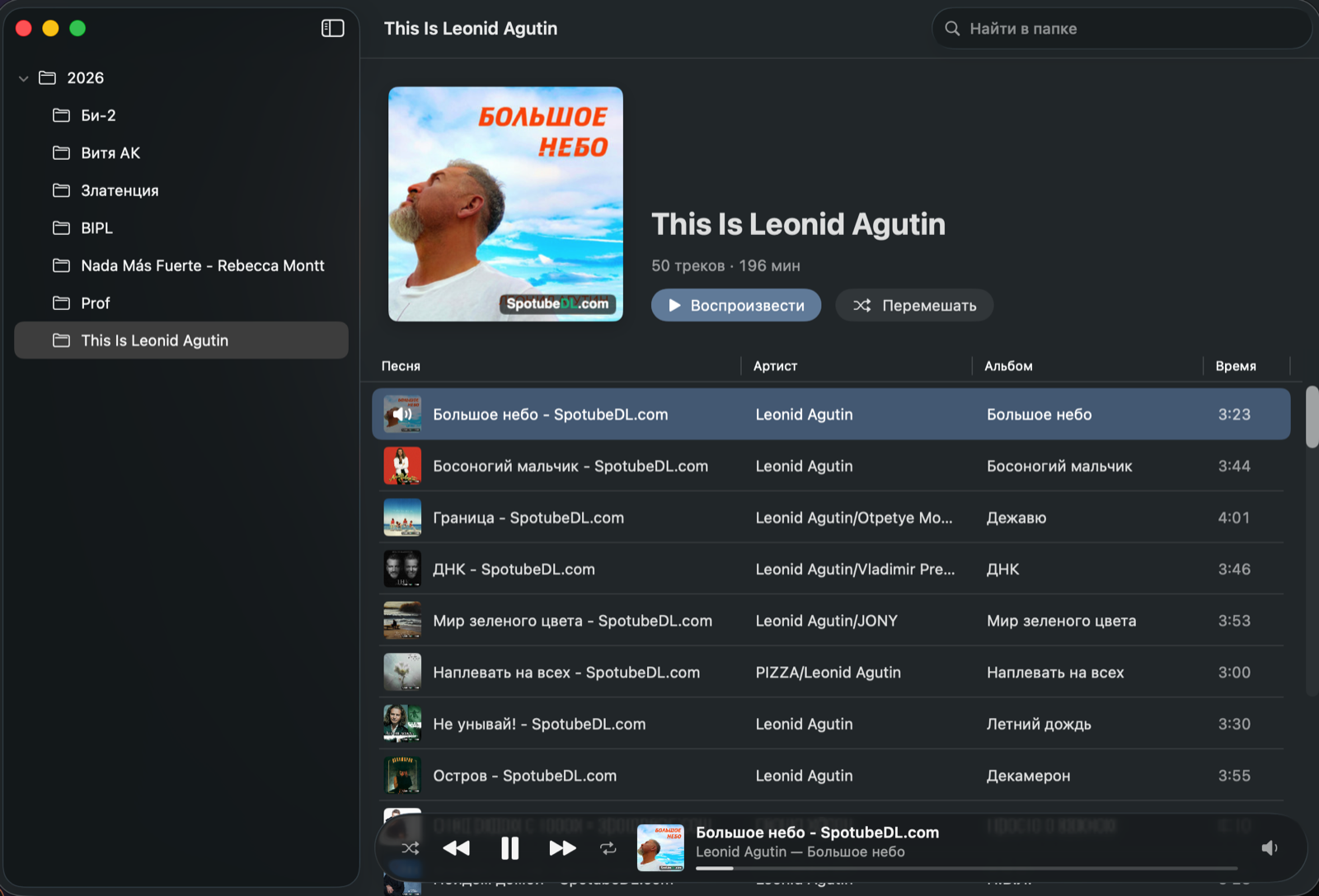
Features
Folders are the library
The sidebar mirrors your folder tree, the main pane lists the selected folder's tracks. Nothing is imported or indexed.
Native formats
MP3, AAC/M4A, FLAC, WAV, AIFF and CAF — everything macOS plays, lossless included.
Tags and artwork
Titles, artists, albums and covers from file tags. Legacy Windows-1251 ID3 tags show up as proper Cyrillic.
Apple Music feel
Album header with Play and Shuffle, a clean track table, a floating Liquid Glass player bar.
Your own output device
Music to a Bluetooth speaker, system sounds on the Mac speakers. Speaker disconnects — music keeps playing and moves back on reconnect.
Keyboard and media keys
Space pauses, Enter plays a track. Media keys and Control Center just work.
Tiny and native
Swift, SwiftUI and AVFoundation. Zero third-party dependencies.
Install
- Download
Siply-x.y.z.dmgfrom GitHub Releases. - Open it and drag Siply to Applications.
- Launch Siply and pick your music folder.